The Evolution of Processors in Industrial Computing: From Basic Automation to Edge AI
Executive Summary
The industrial technology landscape is undergoing a massive transformation, driven by the need for faster data processing, localized artificial intelligence (AI), and reliable performance in harsh environments. As organizations deploy an industrial rugged tablet or a rugged laptop computer, the underlying processor (CPU) dictates the ultimate business value. This white paper analyzes the progression of industrial processors—from highly efficient low-power chips to advanced Edge AI computing platforms.
By understanding the technical specifications of processors (such as core counts, thread architecture, and thermal design power), IT decision-makers can correctly match processing power to specific operational needs. Whether deploying a vehicle mount computer for logistics or a fanless industrial pc for manufacturing automation, selecting the right processing architecture reduces downtime, extends equipment lifecycles, and enables next-generation smart manufacturing.
Key Insight: The shift from traditional multi-core architectures to heterogeneous processors (combining Performance Cores and Efficient Cores) and dedicated AI processing units is redefining the return on investment (ROI) for enterprise mobility and edge computing deployments.
Industry Challenge Overview
Current Industry Problems and Operational Bottlenecks
Modern industrial operations generate unprecedented amounts of data. Historically, legacy devices struggled to process complex data streams locally, relying instead on cloud connectivity. This created severe latency issues, especially in remote field service or fast-paced manufacturing lines. Furthermore, devices like a rugged handheld for inventory require long battery life, while an industrial pc for machine control demands intense computational power. Balancing thermal limits, power consumption, and processing capability remains a critical bottleneck.
Understanding the CPU in Industrial Context
The Central Processing Unit (CPU) is the brain of any industrial computing device. In enterprise environments, the CPU does not just run software; it powers automated decision-making, visual quality inspections, and real-time data synchronization.
Quick Answer: What makes an industrial processor different? Industrial processors are selected based on their ability to deliver sustained performance under strict thermal constraints (TDP), ensuring stable operation without thermal throttling in a fully rugged laptop or an industrial touch panel pc.
Why It Matters
Mismatching the CPU to the application leads to inefficiencies. Underpowered devices cause operational delays and software crashes, while overpowered devices waste battery life and increase upfront costs. Understanding processor specifications is the first step toward optimizing enterprise digital transformation.
Technical Analysis
To understand how processors deliver business value, we must first break down their core technical concepts:
Cores: Cores are the primary computational units. Modern CPUs utilize an asymmetric architecture featuring Performance Cores (P-cores) for high-intensity tasks and Efficient Cores (E-cores) for background tasks and power savings.
Threads: Threads allow a single core to process multiple tasks simultaneously, vastly improving multitasking capabilities.
Frequency: Base frequency is the normal operating speed, while Turbo (Burst) frequency is the peak speed achieved for brief, intensive workloads.
Cache: The cache is high-speed memory built into the CPU (L1, L2, L3) that stores frequently used data, preventing the CPU from waiting on slower system memory.
TDP (Thermal Design Power): TDP indicates the maximum heat generated by the CPU at base frequencies, determining cooling requirements and battery consumption.
Technical Comparison Table
Processor Model
Architecture & Cores
Threads
Max Frequency
Cache
TDP / cTDP
Primary Technical Focus
N5100 / N5105
4 Cores
4
2.8 GHz
–
6W
Low power consumption for fanless designs.
i5-1235U / i7-1255U
10 Cores (2P + 8E)
12
4.7 GHz
12MB
15W (12-55W)
Balanced computing for complex data tasks.
Ultra 5 125H / 7 155H
16 Cores (6P + 8E + 2 LPE)
22
4.8 GHz
24MB
28W (20-115W)
High-efficiency with basic AI workload support.
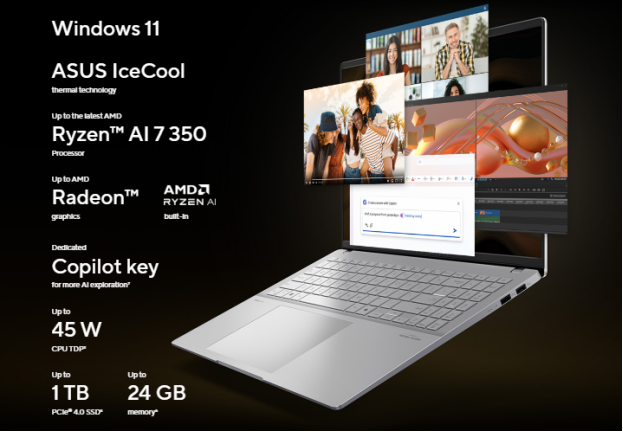
Ryzen AI 7 350
8 Cores (All Large)
16
5.0 GHz
24MB
28W (15-54W)
Integrated AI processing for localized visual models.
Ryzen AI Max+ 395
16 Cores (All Large)
32
5.1 GHz
80MB
55W (45-120W)
Massive localized AI and large visual model processing.
ARM MT6789
8 Cores (2xA76 + 6xA55)
8
2.2 GHz
–
–
Heterogeneous ARMv8-A architecture for high mobility.
Feature-to-Business Value Analysis
Technical specifications must translate into measurable operational improvements.
Feature-to-Benefit Table
Feature / Specification
Technical Advantage
Operational Benefit
Business Value
6W TDP (N5100)
Minimal heat generation requiring no active cooling.
Optimizes power distribution based on task intensity.
Extends battery life without sacrificing peak performance.
Ensures full-shift operation for field workers, increasing productivity.
High Thread Count (32T)
Processes multiple heavy data streams simultaneously.
Eliminates system lag during complex machine control.
Improves operational efficiency and equipment utilization rates.
Large Cache (80MB)
Rapid data retrieval for local processing algorithms.
Accelerates real-time decision-making for AI.
Reduces data latency, directly improving worker safety and quality control.
ARM Heterogeneous Cores
Balances extreme mobility with capable processing.
Delivers smooth user experiences on lightweight devices.
Lowers deployment costs while ensuring high user adoption rates.
Application Scenarios
Different industrial environments demand specific processing solutions. Selecting the correct CPU architecture ensures the hardware meets the exact pain points of the sector.
Expert Recommendation: Do not over-specify processing power for simple inventory tasks, but never under-specify for Edge AI and visual inspection. Align the CPU’s TDP and thread count directly with the software payload.
Application Scenario Table
Industry
Hardware Format
Primary Pain Point
Recommended CPU
Operational Outcome
Manufacturing
industrial pc for manufacturing
High latency in cloud-based visual defect detection.
Ryzen AI 7 350
Real-time, localized defect identification via AI video analysis.
Warehouse/Logistics
forklift tablet
Short battery life disrupting 24/7 continuous operations.
N5100 / ARM MT6789
Full-shift stability with low power consumption and seamless data syncing.
Field Service
rugged laptop for field service
Handling complex diagnostic software in remote areas.
i5-1235U / i7-1255U
Fast data processing and multi-tasking without relying on cloud access.
Healthcare
rugged medical tablet
Slow access to large patient data files and imaging.
Ultra 5 125H
Rapid image rendering and AI-assisted diagnostics at the point of care.
Machine Control
industrial touch monitor
Unstable HMI interfaces during peak computational loads.
i5-1235U / i7-1255U
Fluid multi-touch responsiveness and zero-downtime automation control.
ROI and Operational Impact
Deploying optimized processing architectures directly influences the bottom line.
Business Impact Table
Impact Area
Legacy Solution Weakness
Optimized CPU Advantage
Measurable Result
Maintenance
Moving parts (fans) fail in dusty environments.
Low TDP enables fanless, fully sealed enclosures.
Up to 40% reduction in hardware failure rates.
Productivity
Waiting for cloud data processing.
High-frequency cores and large cache process locally.
Accelerated task completion, saving up to 1 hour per worker daily.
Lifecycle
Software updates outgrow CPU capabilities quickly.
High thread counts and AI-ready architectures future-proof the device.
Extends device refresh cycles from 3 years to 5+ years.
ROI Table
Investment Strategy
Initial Cost Implication
Long-Term Financial Return
Break-Even Timeline
Deploying N5100 for Basic Inventory
Lower initial capital expenditure.
Massively reduced power consumption and lower replacement rates.
8 – 12 Months
Deploying Ryzen AI Max+ for Manufacturing
Higher initial capital expenditure.
Automates QA processes, reducing manual inspection labor and defect waste.
12 – 18 Months
Deploying ARM for Field Mobility
Moderate capital expenditure.
Maximizes workforce efficiency and eliminates mid-shift charging downtime.
6 – 10 Months
Industry Best Practices
When integrating rugged and industrial computing solutions, organizations should adhere to the following best practices:
Audit Software Payloads: Always measure the multi-threading capability of your proprietary software before selecting a CPU.
Prioritize Thermal Management: In environments exceeding 50°C, prioritize low-TDP processors over high-frequency options to prevent thermal throttling.
Plan for Edge AI: Even if AI is not currently utilized, selecting an AI-ready CPU (like the Ryzen AI series) protects the investment for future Industry 4.0 rollouts.
Standardize Architectures: Maintain a consistent architecture (e.g., all ARM or all x86) across mobile fleets to simplify IT management and MDM (Mobile Device Management) deployments.
Future Trends
The intersection of rugged computing and advanced processing is paving the way for unprecedented operational models.
Edge AI Dominance: The reliance on cloud computing is decreasing. Localized large visual models, powered by processors like the Ryzen AI Max+ 395, will allow a standalone industrial panel pc for factory to execute real-time decisions without network connectivity.
Heterogeneous Computing in Heavy Industry: The integration of P-cores and E-cores, originally designed for consumer laptops, will become the standard for devices like a vehicle pc, perfectly balancing intense navigation software with low-power background telemetry.
Smart Manufacturing Convergence: Processing power will bridge the gap between IT (Information Technology) and OT (Operational Technology), allowing a single embedded industrial pc to handle both machine control and enterprise resource planning integrations.
Industry Perspective: By 2028, over 60% of all industrial computing edge deployments will feature dedicated AI processing capabilities, shifting the paradigm from data collection to autonomous operational intervention.
Frequently Asked Questions
What is the difference between an N5100 and an i5 processor for an industrial computer? The N5100 is a 6W, 4-core processor optimized for low power consumption and fanless operation, ideal for simple tasks. An i5 processor features a higher TDP and up to 10 cores, designed for complex data processing, multi-tasking, and heavy industrial automation workloads.
Why is TDP important when selecting a rugged android tablet? TDP (Thermal Design Power) determines how much heat the processor generates. In a rugged android tablet, a low TDP ensures the device can remain completely sealed against water and dust without overheating during operation.
How does Edge AI processing benefit a rugged laptop for manufacturing? Processors like the Ryzen AI 7 350 allow a rugged laptop for manufacturing to run local visual defect detection algorithms. This eliminates the latency of sending video feeds to the cloud, resulting in instantaneous quality control.
When should I choose an ARM architecture over x86? ARM architectures (like the MT6789) are ideal for an android rugged handheld where extreme mobility, lightweight design, and ultra-long battery life are the primary requirements. x86 is better suited for legacy Windows software compatibility.
What is the advantage of Performance Cores (P-Cores) and Efficient Cores (E-Cores)? This architecture allows a windows rugged laptop to assign heavy tasks (like 3D rendering) to P-Cores, while background tasks (like system updates) run on low-power E-Cores. This maximizes performance while preserving battery life.
Can an industrial panel PC process AI tasks locally? Yes. By utilizing advanced processors like the Core Ultra or Ryzen AI series, an industrial panel pc can execute low-to-high load AI models directly at the machine level, enhancing smart manufacturing capabilities.
Why does a forklift tablet need a stable processor? A forklift tablet operates in environments with extreme vibration and temperature fluctuations. A stable, low-power CPU ensures the device does not overheat and maintains constant communication with the Warehouse Management System (WMS).
How does CPU cache impact industrial automation? Cache is ultra-fast memory embedded in the CPU. A larger cache (like the 80MB on the Ryzen AI Max+ 395) allows the CPU to retrieve automation data instantly, reducing lag and ensuring synchronized machine control.
Key Takeaways
Processor matching is critical: Aligning CPU specifications (cores, TDP, cache) with actual software payloads prevents hardware overspending and underperformance.
Low TDP enables ruggedization: Processors with 6W to 15W TDPs are essential for creating completely sealed, fanless industrial computers that survive harsh environments.
Hybrid cores extend mobility: The integration of P-Cores and E-Cores ensures field workers get full-shift battery life without sacrificing peak performance when needed.
Edge AI is the new standard: Modern CPUs are shifting from simple data processors to intelligent decision engines, capable of running local visual inspection models.
Architecture dictates longevity: Investing in higher thread counts and AI capabilities future-proofs industrial hardware against rapidly evolving Industry 4.0 software demands.
Conclusion
The deployment of industrial technology is no longer just about robust exteriors; it is entirely dependent on the processing intelligence housed within. From the highly efficient N5100 powering a rugged handheld computer to the massive AI capabilities of the Ryzen AI series driving complex manufacturing inspections, the CPU dictates operational efficiency, equipment lifecycle, and overall business value. By strategically selecting the right processor architecture, enterprises can significantly reduce downtime, optimize their workforce, and confidently scale their digital transformation initiatives.
About the Technology Contributor
This white paper is published by EmdoorPC, a professional provider of industrial computing and rugged mobility solutions.
With extensive experience in rugged tablets, rugged laptops, vehicle-mounted computers, industrial PCs, and industry-specific digital transformation projects, Emdoor and Onerugged continue to support enterprises across manufacturing, logistics, utilities, public safety, and field service sectors.
For organizations evaluating rugged mobility technologies, understanding the relationship between technical specifications and operational outcomes is critical for long-term deployment success.